From I forgot to film that← this feeling to I got everything I needed
Shot planning for solo creators, small teams, and anyone who's sat down to edit and realised half the footage is missing.
You know this feeling.
- You own seven cameras and forget to press record on half of them
- You get home and realise you missed the one shot that ties the whole video together
- Your footage is scattered across four SD cards with no labels
- You spend more time looking for clips than actually editing
- You wing it on location and hope it works in the edit. It doesn't
You planned for this.
- Every shot is mapped before you leave the house
- Your shot list tells you exactly what to capture, in what order, on which camera
- You tick shots off as you film — nothing gets missed
- Every clip is tagged with camera, SD card, and file name
- You sit down to edit and the footage assembles itself
Plan the story. Shoot the list. Find every file.
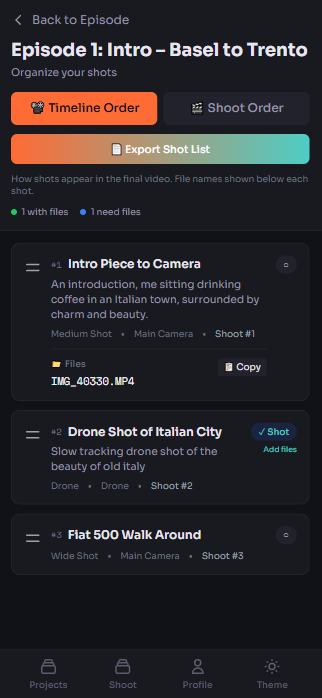
Storyboard the edit — tap a feature to switch
Four steps between chaos and a finished video.
Think in stories
Create a project. Add episodes. Build your storyboard in the order your audience watches. Beginning, middle, end — before you've touched a camera.
Plan what you need
Add shots to each scene. Wide, medium, close-up. Which camera. What time of day. The details that turn "I'll figure it out" into "I know exactly what I need."
Shoot with purpose
On location, switch to shoot mode. Your list is reordered for efficiency. Tick each shot as you capture it. When every box is checked, you've got everything.
Edit without the panic
Every shot tagged with camera, card, and file. Open your editor and everything maps back to your storyboard. No more digging through folders at 2am.
“I built Storeyz because I kept forgetting to film things. I'd get home with hours of footage and none of the shots I actually needed. If I have this problem, every solo creator does.”
Ross Jones — Founder, creator, guy with too many cameras
...seriously, too many camerasPick a plan. Cancel whenever you like.
Get organised
Everything you need to stop winging it.
- Up to 5 projects
- Unlimited episodes & shots
- Board view & shoot mode
- Exportable shot lists
No limits
Unlimited everything. Ship content daily.
- Unlimited projects
- Everything unlimited
- Priority support
- Early feature access
Pay once. Forever.
Lifetime access. 100 spots. Then it's gone.
- Everything in Producer
- Lifetime updates
- VIP support
- Founding member badge
30-day money-back guarantee · Cancel anytime
The questions everyone asks
What is a shot list?
A shot list is a plan of every shot you need to capture before you start filming. It usually records the shot type (wide, medium, close-up), the location, the camera or device, and any notes about framing. Working from a shot list is the difference between getting everything you need on the day and discovering the gaps in the edit.
Is Storeyz free?
Storeyz plans start at £9 per month for Creator (£7 billed annually), £15 per month for Producer, and a one-time £199 Founding 100 lifetime plan. Every plan is covered by a 30-day money-back guarantee and can be cancelled at any time.
How is Storeyz different from StudioBinder?
StudioBinder is built for film and commercial crews, with call sheets, contacts, and crew scheduling. Storeyz is built for solo creators and small teams. It keeps two views of the same list — story order for planning the edit and shoot order for the day itself — and adds a shoot mode you tick off on your phone on location.
Can I use Storeyz on my phone while filming?
Yes. Shoot mode is designed for one-handed use on location. Your shots are regrouped into the most efficient order to actually capture them, and you tick each one off as you get it, so you always know exactly what is still outstanding before you leave.
Can I export my shot list?
Yes. Any shot list can be exported to hand off to an editor, a client, or a second shooter, so the plan does not stay locked inside the app.
The shot you planned
is the shot you get.
Your cameras are ready. Your story is waiting. The only thing missing is the plan.
Start planningno more “I forgot to film that” moments →